Understanding Agent Teams vs Subagents in Claude Code
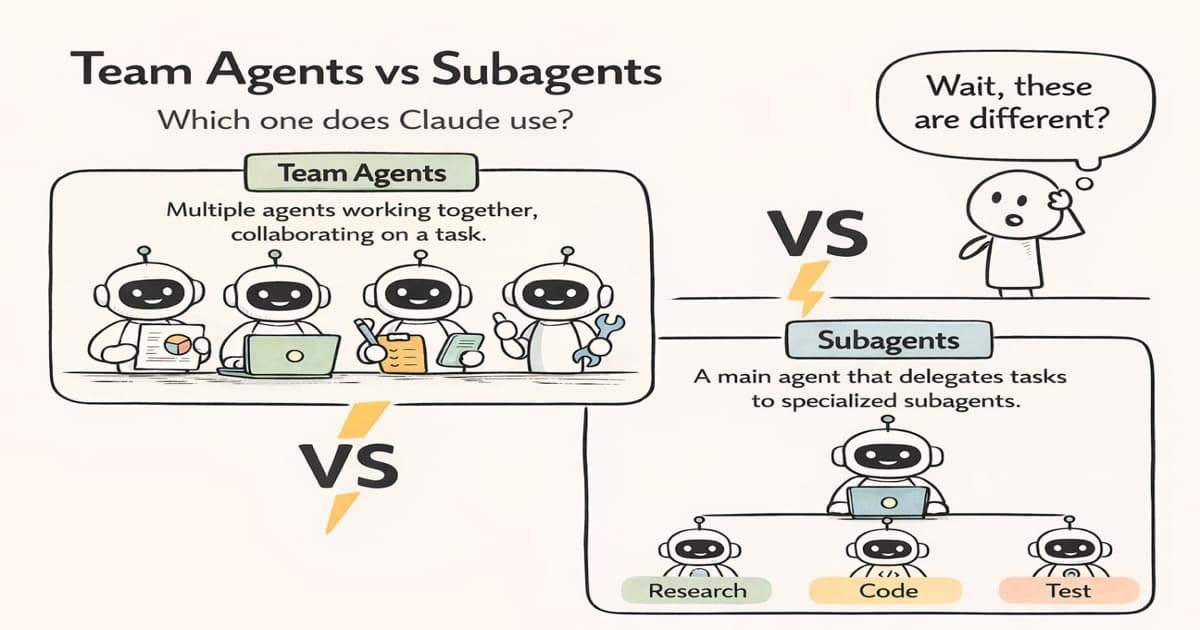
Claude Code supports two distinct multi-agent patterns: subagents and agent teams. Both let you split work across multiple Claude instances, but they solve fundamentally different problems. Picking the wrong one means either burning tokens on unnecessary coordination or bottlenecking on communication you didn't plan for.
This post breaks down how each pattern works, when to reach for one over the other, and the design principles that keep multi-agent systems from spiraling out of control.
1Start with a Single Agent
Before reaching for multi-agent patterns, the most important principle: start with a single agent. Most tasks don't need parallelism. A single Claude instance with the right tools and context can handle surprisingly complex work. Only introduce multiple agents when you can measure a clear bottleneck — context window overflow, tasks that are genuinely independent, or coordination that a single agent can't manage in one pass.
Adding agents adds complexity. More agents means more token usage, more potential for duplicated work, and more failure modes. The goal is always to use the simplest architecture that gets the job done.
2Subagents: Isolated, Fire-and-Forget Workers
A subagent is a specialized Claude instance that runs in its own isolated context window. Think of it like delegating a focused research task to a colleague — you hand them a specific question, they go off and find the answer, and they come back with a distilled summary. You never see their intermediate reasoning.
Each subagent gets:
- Its own clean context window — no pollution from the parent's conversation
- A specific task description — one job, clearly scoped
- Access to tools — file reads, searches, shell commands
- A short lifespan — it completes its task and returns the result
# Claude Code spawns subagents via the Agent tool
# Example: exploring two parts of a codebase in parallel

Agent 1: "Find all API route handlers and list their HTTP methods"
Agent 2: "Search for database migration files and summarize schema changes"

# Both run independently, return summaries to the parent
The parent agent receives compressed summaries — not the full reasoning chain. This is the key advantage: context protection. If a subagent reads 50 files to answer a question, only the distilled answer enters the parent's context. Without subagents, all that intermediate noise would eat into your context window.
The communication model is strictly parent → child → parent. Subagents can't talk to each other. They don't know other subagents exist. This makes them perfect for embarrassingly parallel tasks where each subtask is fully independent.
3Agent Teams: Persistent, Communicating Instances
Agent teams are a fundamentally different model. Where subagents are short-lived workers that complete a task and disappear, agent teams are long-running instances that persist, communicate directly with each other, and coordinate through shared state.
The structure typically includes:
- A team lead that coordinates work, assigns tasks, and synthesizes results
- Teammates — independent agent instances with their own context
- A shared task list tracking what's pending, in progress, and done
- Direct messaging — agents can send messages to specific teammates by name
The critical difference is peer-to-peer communication. In a subagent system, all information flows through the parent. In an agent team, teammates can message each other directly. If Agent A discovers something that changes what Agent B should do, A can tell B without routing through the lead.
# Agent team structure
Team Lead → assigns tasks, reviews results
  ├── Agent "frontend" → implements UI components
  ├── Agent "backend"  → builds API endpoints
  └── Agent "tests"    → writes test suites

# Agents communicate via SendMessage
"frontend" → "backend": "What shape does the /api/users response return?"
"backend" → "frontend": "{ id: string, name: string, email: string }"4Key Differences at a Glance
| Aspect | Subagents | Agent Teams |
|---|---|---|
| Lifespan | Short-lived, single task | Persistent, accumulate context |
| Communication | Parent ↔ child only | Peer-to-peer messaging |
| State | Isolated context per agent | Shared task tracking |
| Information flow | Compressed summaries returned | Full context sharing possible |
| Best for | Parallel, independent tasks | Coordinated, interdependent work |
5When to Use Each
Use subagents when:
- Tasks are embarrassingly parallel — independent research, codebase exploration, lookups
- You need context protection — subtasks generate a lot of intermediate output you don't need
- The parent only needs the final summary, not the reasoning chain
- You want to keep token costs low by avoiding context bloat
Use agent teams when:
- Work requires mid-task negotiation — agents need to reconcile outputs before proceeding
- A discovery in one thread changes what another thread should do
- You have task dependencies and blocking relationships
- Agents need to build on each other's work over multiple rounds
6Design Around Context, Not Roles
A common mistake is splitting agents by job title — "the frontend agent," "the database agent," "the testing agent." This feels intuitive but often creates the wrong boundaries.
Instead, design around context boundaries. Ask: do these subtasks need deeply overlapping information? If two agents need to read the same 20 files to do their work, they probably shouldn't be separate agents — you're just duplicating context and paying double the tokens.
Split where information genuinely diverges. If one task needs the frontend codebase and another needs the infrastructure config, those are natural context boundaries. If both need the same API route file, keep them together.
7Common Pitfalls
Three failure modes show up repeatedly:
- Vague task descriptions — if you don't clearly scope what each agent should do, they'll duplicate work or miss gaps. Be specific about inputs, outputs, and boundaries.
- Weak verification criteria — agents will report "done" even when the output is incomplete. Define what "done" looks like before dispatching.
- Uncontrolled token costs — every agent consumes tokens independently. Route routine work to cheaper models and reserve the most capable model for genuinely hard decisions.
Conclusion
Subagents and agent teams aren't competing patterns — they solve different problems. Subagents give you cheap, isolated parallelism for independent tasks. Agent teams give you rich coordination for interdependent work. The mistake is reaching for either one before you've outgrown a single agent.
Start simple. Measure where you bottleneck. Then pick the pattern that matches the shape of your problem — parallel and independent, or coordinated and interdependent.