Understanding BullMQ Job Stalling and How to Fix It
If you've worked with BullMQ in production, you've probably encountered the dreaded stalled event. A job that was supposed to be processing suddenly gets flagged as stalled, retried, or worse — permanently failed. Understanding why this happens requires knowing how BullMQ's lock mechanism works under the hood.
This post breaks down the three core concepts behind job stalling: lock duration, heartbeats, and stall detection — and gives you practical strategies to prevent it.
1The Job Lifecycle
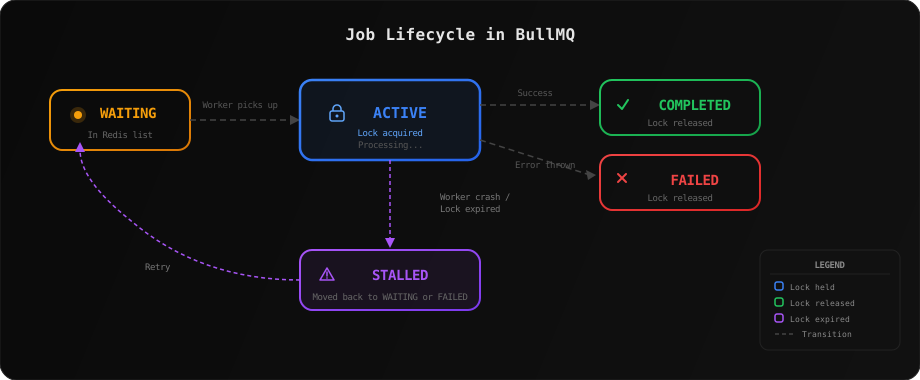
Every BullMQ job goes through a series of states. When you add a job to a queue, it enters the WAITING state in a Redis list. A worker picks it up and moves it to ACTIVE — at this point, BullMQ acquires a lock on the job in Redis. The lock is a key with a TTL that says: "this worker owns this job."
If the job completes successfully, the lock is released and the job moves to COMPLETED. If the processor throws an error, the lock is released and the job moves to FAILED. But what happens when a worker crashes mid-processing? The lock eventually expires, and BullMQ detects the job as STALLED.
2Lock Duration: The Ownership Lease
When a worker picks up a job, it acquires a Redis lock with a TTL equal to lockDuration (default: 30,000ms). This lock is essentially a lease — it tells other workers and the stall checker: "I'm working on this, don't touch it."
import { Worker } from 'bullmq';

const worker = new Worker('my-queue', async (job) => {
  // Your processing logic here
  await processJob(job.data);
}, {
  connection: { host: 'localhost', port: 6379 },
  lockDuration: 30000,  // 30 seconds (default)
});
The lock is stored in Redis as a key with the worker's token as the value. Under the hood, BullMQ uses a Lua script to atomically move the job from the waiting list to the active set and set the lock in a single Redis operation:
-- Simplified view of what BullMQ does internally
-- 1. Move job from wait to active
LREM  bull:my-queue:wait 0 "job-42"
ZADD  bull:my-queue:active 0 "job-42"

-- 2. Set the lock with TTL
SET   bull:my-queue:job-42:lock <worker-token> PX 30000
If processing finishes before the lock expires — great, the lock is released explicitly. But if your job takes longer than 30 seconds, the lock would expire and the job would appear abandoned. This is where heartbeats come in.
3Heartbeats: Keeping the Lock Alive
BullMQ automatically sends heartbeats while a job is being processed. A heartbeat is simply a lock renewal — it extends the lock's TTL by another lockDuration. By default, heartbeats are sent every lockDuration / 2 milliseconds (every 15 seconds with the default 30s lock).
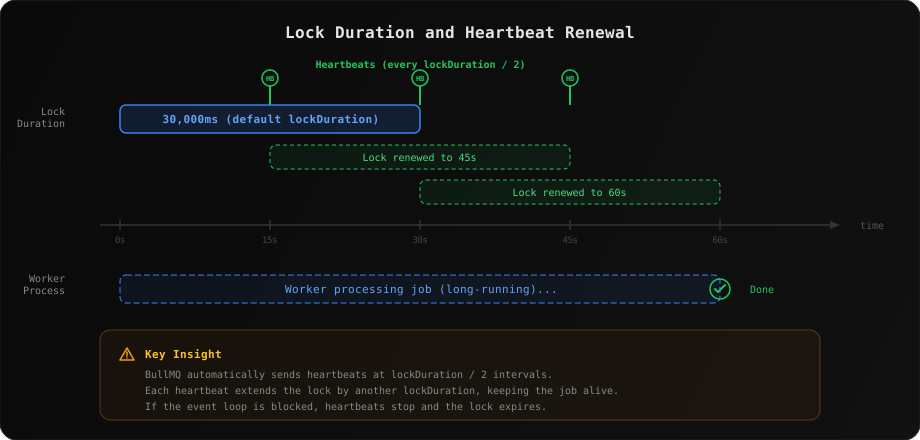
This is the critical insight: heartbeats run on the Node.js event loop. They are scheduled using timers. As long as the event loop is free to process timers, heartbeats will fire on time and the lock stays alive. Your job can run for hours — the lock just keeps getting renewed.
But here's the catch: if the event loop is blocked, heartbeats can't fire. Common culprits include:
- CPU-intensive synchronous operations — heavy JSON parsing, image processing, crypto operations without using streams
- Synchronous file I/O — using
fs.readFileSyncon large files - Long-running native addons — some C++ addons block the event loop
- Worker process crash or OOM kill — the process dies entirely
// This WILL cause stalling — blocks the event loop
const worker = new Worker('pdf-queue', async (job) => {
  // Synchronous CPU-heavy work blocks heartbeats
  const result = heavySyncComputation(job.data); // 45 seconds
  return result;
}, {
  lockDuration: 30000, // Lock expires at 30s, but work takes 45s
});

// Heartbeats can't fire because the event loop is blocked!
// After 30s the lock expires -> job is stalled// Option 1: Use job.extendLock() for known long operations
const worker = new Worker('pdf-queue', async (job) => {
for (const chunk of dataChunks) {
await processChunk(chunk);
// Manually extend the lock if needed
await job.extendLock(job.token!, 30000);
}
});
// Option 2: Increase lockDuration for known slow jobs
const worker = new Worker('pdf-queue', async (job) => {
await generatePdf(job.data);
}, {
lockDuration: 120000, // 2 minutes — gives more headroom
});
// Option 3: Offload CPU work to a worker thread
import { Worker as BullWorker } from 'bullmq';
import { Worker as ThreadWorker } from 'worker_threads';
const worker = new BullWorker('pdf-queue', async (job) => {
// Runs in a separate thread — doesn't block the event loop
await runInWorkerThread(job.data);
});4Stall Detection: The Safety Net
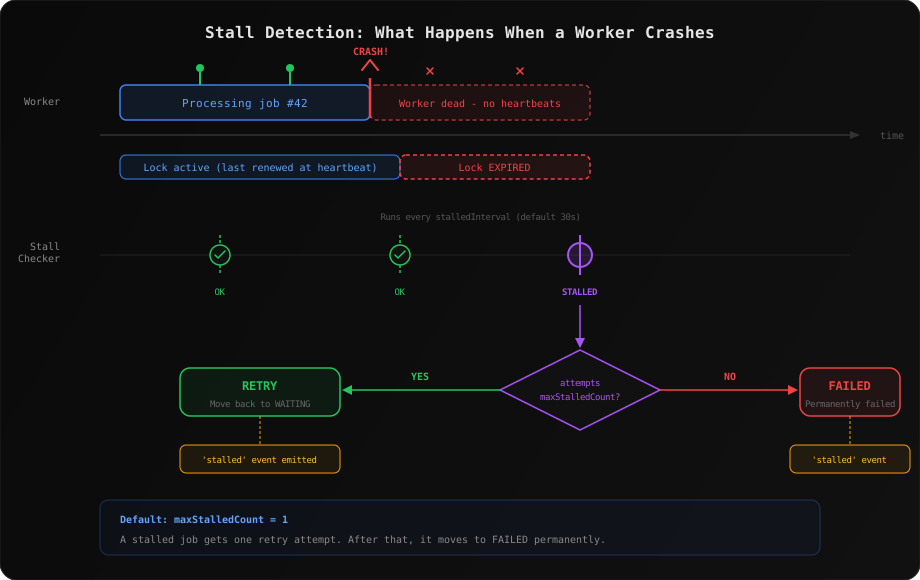
BullMQ has a built-in stall checker that runs periodically to find jobs that are in the ACTIVE state but whose locks have expired. By default, it runs every stalledInterval milliseconds (default: 30,000ms).
When the stall checker finds a job with an expired lock, it checks how many times that job has already been stalled. If the count is less than maxStalledCount (default: 1), the job is moved back to WAITING for retry. Otherwise, it's moved to FAILED permanently.
import { Worker, QueueEvents } from 'bullmq';

const worker = new Worker('my-queue', processor, {
  connection,
  lockDuration: 30000,      // How long the lock lasts (ms)
  stalledInterval: 30000,   // How often to check for stalled jobs (ms)
  maxStalledCount: 2,       // Retry stalled jobs up to 2 times
});

// Listen for stalled events
const queueEvents = new QueueEvents('my-queue', { connection });

queueEvents.on('stalled', ({ jobId, prev }) => {
  console.warn(`Job ${jobId} has stalled (prev state: ${prev})`);
  // Alert your monitoring system here
});
Important detail: the stall checker runs inside each worker instance. If all your workers crash simultaneously, there's nothing running the stall checker either. The jobs will remain in the ACTIVE state with expired locks until a worker comes back online and runs the check.
5Putting It All Together: The Stall Timeline
Let's walk through exactly what happens when a job stalls, assuming default settings:
- t=0s — Worker picks up the job, acquires a 30s lock
- t=15s — First heartbeat fires, lock extended to t=45s
- t=20s — Worker crashes (OOM, uncaught exception, etc.)
- t=45s — Lock expires (last renewal was at t=15s for 30s)
- t=45s–75s — Next stall check runs (another worker or restarted worker)
- t=75s — Job detected as stalled, moved back to WAITING (first stall attempt)
So in the worst case, a stalled job can sit undetected for up to lockDuration + stalledInterval — about 60 seconds with defaults. If that's too long for your use case, you can lower both values (at the cost of more frequent Redis operations).
6Preventing Stalled Jobs in Production
Here are battle-tested strategies to minimize or eliminate stalled jobs:
Never block the event loop
This is the #1 cause of stalled jobs. Use worker_threads for CPU-heavy work, stream large files instead of reading them synchronously, and break long synchronous operations into async chunks.
Tune lockDuration for your workload
If your jobs routinely take 2+ minutes, set lockDuration to at least 2x your expected processing time. This gives the heartbeat mechanism plenty of buffer. Don't set it too high though — a crashed worker's jobs won't be detected until the lock expires.
Use job.extendLock() for unpredictable durations
If your job has phases of varying length, manually extend the lock at checkpoints:
const worker = new Worker('etl-queue', async (job) => {
  // Phase 1: Download (quick)
  const data = await downloadData(job.data.url);

  // Phase 2: Transform (slow, unpredictable)
  for (let i = 0; i < data.rows.length; i++) {
    await transformRow(data.rows[i]);

    // Extend lock every 1000 rows
    if (i % 1000 === 0) {
      await job.extendLock(job.token!, 60000);
      await job.updateProgress(Math.round((i / data.rows.length) * 100));
    }
  }

  // Phase 3: Upload
  await uploadResults(data);
});
Monitor stalled events
Always listen for the stalled event and pipe it to your alerting system. A stalled job is a symptom — it means either your event loop is being blocked, your workers are crashing, or your lock duration is too short.
Set concurrency carefully
Higher concurrency means more jobs competing for the event loop. If each job does some synchronous work, the aggregate can block heartbeats for other jobs. Start with concurrency: 1 and increase only after profiling.
Quick Reference
| Option | Default | Purpose |
|---|---|---|
| lockDuration | 30000ms | How long a worker's lock on a job lasts |
| stalledInterval | 30000ms | How often the stall checker runs |
| maxStalledCount | 1 | Max times a job can stall before failing permanently |
| lockRenewTime | lockDuration / 2 | How often heartbeats fire (auto-calculated) |
Conclusion
Job stalling in BullMQ isn't a bug — it's a safety mechanism. It exists to recover from worker failures gracefully. The lock is the ownership lease, heartbeats keep renewing it, and the stall checker catches jobs that fall through the cracks.
The key takeaway: keep the event loop free. If heartbeats can fire, your locks stay alive, and your jobs won't stall. When you can't guarantee that, tune your lockDuration, use job.extendLock(), and always monitor the stalled event.